Attachments in Outlook are appearing in Message Body
Solution
Sometimes while copy and paste the attachments in outlook it will show in message body .
Follow the below steps to change it.
Change the message format to HTML, Rich Text Format, or plain text
Change the format of one new message
- Create a message.
- If you’re working in the Reading Pane, click Pop Out.
(If you aren’t working in the Reading Pane, you don’t need to do this.)
- In the message window, click Format Text, and then click HTML, Plain Text, or Rich Text.
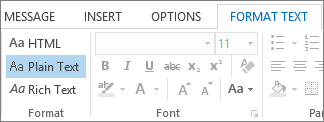
Change the format of all new messages
- Click the File tab.
- Click Options.
- Click Mail.
- Under Compose messages, in the Compose messages in this format list, click HTML, Plain Text, or Rich Text.


Comments
Post a Comment